Sunday, January 29, 2012

Enemies

I haven't posted about game mechanics in a bit, so I guess I'll talk about how I implemented enemies! This will also contain a modification I made to my asset system, as well as another one that I would like to make in the future. So here we go!

An instance of the Enemy class is created for almost everything in the game that has the potential to kill the player. The exceptions to this are doors and light gates (implemented with another class called Static) and the spikes that line the edges of some levels.

Now in order to create a single Enemy class that can represent any type of enemy, I had to use a lot of switch statements. For the non programmers out there, a switch statement lets you define several different cases and execute a different block of code depending on which case fits. For my purposes, I could check which type of enemy a particular instance of the Enemy class is and make sure it behaves correctly.


//Conditional x collision depending on enemy type
    if(type==SLIME){
     if(assets.getBg().checkCollisionX(collision, yPos) || assets.getBg().checkGap(collision, yPos+spriteHeight)){
      collided=true;
     }
    }else if(type==STINGER){
     if(assets.getBg().checkCollisionX(collision, yPos) || assets.getBg().checkCollisionX(collision, yPos+spriteHeight-assets.getBg().tileSize) || (xPos<=xBoundL && xSpeed<0) || (xPos>=xBoundR&&xSpeed>0)){
      collided=true;
     }
I again use a switch statement to define different hitboxes depending on the type of enemy
public Rect getLoc(){
  if(type==STINGER){
   return new Rect(xPos+40,yPos+40,xPos+spriteWidth-20,yPos+spriteHeight-25);
  }else if(type==LIGHT_TRAP){
   return new Rect(xPos,yPos+15,xPos+spriteWidth,yPos+spriteHeight);
  }else{
   return new Rect(xPos,yPos,xPos+spriteWidth,yPos+spriteHeight);
  }
 }


This setup makes it very simple for me to add new enemies in. I simply need to add cases defining it's hitbox and movement pattern and I'm set!

Another consideration I  needed to make was how I manage the bitmaps containing spritesheets for these enemies. My original implementation had all of the enemy sprite sheets aliased correctly such that each sheet was loaded once per type of enemy. However, whenever an enemy switched directions or was flipped from on to off, the change was handled within the enemy class. This meant that eventually, every enemy instance would have it's own sprite sheet. Terribly inefficient, and unavoidable as long as sprite sheet changes are handled by the enemy itself.

To fix this, I modified my Assets structure (yet again) to contain a bitmap manager for the Enemy class. A data structure was built that stores two sprite sheets per enemy type, labeled by the enemy's type name. The reason I stored two per enemy is that if we have some slimes facing left and some facing right, they can't be read off of the same sheet! Whenever an Enemy is created, it checks the data structure to see if it's bitmaps are loaded in and loads them if needed. When a switch is flipped, the two bitmaps for that enemy are overwritten with the new versions. This way, I can have 2 slimes or 200 slimes in a level with virtually the same memory footprint!

In the future, I'd like to move ALL bitmap allocations into the Assets class. Right now the Player sets up its own bitmaps, the Background sets up a bitmap, etc. A much more elegant and less bug-prone setup would be for the Assets instance created for a level to have a single data structure with all of the bitmaps used for the level. It can then pass every single asset a reference to it's bitmaps, and requires much less work when I want to clean out all of the bitmaps before loading a new level.

Saturday, January 28, 2012

VERSION 0.1 UPDATE

Hey!

So, apparently the game didn't work on phones with different screen sizes...

We fixed that!

It also works on Tablets now!

Download Off-Switch V0.1

Instructions:
  1. Download Offswitch.apk
  2. Email the file to whichever email you have linked to your phone
  3. Open the email on your phone, click install (May have to confirm that you want to allow untrusted apps)
  4. Enjoy!

Feel free to post any suggestions/critiques/bug reports either as comments on this post or emailed to martywalkeranimation@gmail.com (Art/level design) or cjalbert@umd.edu (programming/bugs).

Known Issues

  • Standing inside/slightly under the thin platforms
  • Light gates misbehave a bit when turned off and back on
  • Shadow's head may pass through blocks when hit from the side
FAQ

1. Q: Why won't this run on my device? 
    A: If it doesn't install at all, it's possible that your phone is running on an older version of Android. To make multitouch work correctly, the app supports Android 2.2 and later. 

2. Q: Why can't I save my game?
    A: Saved games aren't in yet.. However, if you hit your phones menu button, there's a skip level button to help you get back to where you left off. No cheating!

3. Q: Can I play on my PC?
    A: Unfortunately, no. The only way to run android apps on a PC is with the AVD Emulator, which is build into the SDK and more for debugging than anything. It lags TERRIBLY.

4. Q: Are you going to make an iPhone version?
    A: Short answer: No. Long answer.. The Android API is built on java, and the iOS API uses Objective C. This means essentially rewriting all of my code. On top of that, my understanding is that Apple charges a 100 dollar developer license fee to write apps, along with requiring the programmer to have an iMac and an iOS device for testing. Finally, apps can't be installed on phones unless approved by Apple, so I wouldn't be able to send you a development version anyways!

Friday, January 27, 2012

Alpha demo now available!

With great excitement and mild exhaustion, I'm happy to announce that we now have an alpha version of Off-Switch available to play! This demo contains all of world one except for the boss fight. So download it, find bugs, show it off to your friends, and have a merry time!

Download Off-Switch V0.1

Instructions:
  1. Download Offswitch.apk
  2. Email the file to whichever email you have linked to your phone
  3. Open the email on your phone, click install (May have to confirm that you want to allow untrusted apps)
  4. Enjoy!

Feel free to post any suggestions/critiques/bug reports either as comments on this post or emailed to martywalkeranimation@gmail.com (Art/level design) or cjalbert@umd.edu (programming/bugs).

Known Issues

  • Standing inside/slightly under the thin platforms
  • Light gates misbehave a bit when turned off and back on
  • Shadow's head may pass through blocks when hit from the side
FAQ

1. Q: Why won't this run on my device?
    A: If it doesn't install at all, it's possible that your phone is running on an older version of Android. To make multitouch work correctly, the app supports Android 2.2 and later. On the other hand, if you play on a tablet or phone with a screen larger than 480x800, there's a scaling issue that I'm working on fixing. Hold tight!

2. Q: Why can't I save my game?
    A: Saved games aren't in yet.. However, if you hit your phones menu button, there's a skip level button to help you get back to where you left off. No cheating!

3. Q: Can I play on my PC?
    A: Unfortunately, no. The only way to run android apps on a PC is with the AVD Emulator, which is build into the SDK and more for debugging than anything. It lags TERRIBLY.

4. Q: Are you going to make an iPhone version?
    A: Short answer: No. Long answer.. The Android API is built on java, and the iOS API uses Objective C. This means essentially rewriting all of my code. On top of that, my understanding is that Apple charges a 100 dollar developer license fee to write apps, along with requiring the programmer to have an iMac and an iOS device for testing. Finally, apps can't be installed on phones unless approved by Apple, so I wouldn't be able to send you a development version anyways!


Wednesday, January 25, 2012

Act 1, Scene 1

We'll be releasing a demo of world 1 in by the end of the week, so I wanted to do at least the intro cut-scene done first.

I've changed the story a bit from what I had originally envisioned. Originally it was going to be this big story where Silhouette (Shadow Jones' girlfriend for those new to the blog) gets possessed along with all of the other creatures, so Jones chases after her and spends the whole game trying to snap her out of it - fighting the bosses whenever they got in his way.

 I made this cut-scene as a stand-in for the first demo, but I think I'm going to go with it. The first story is big and kinda cool, but at the end of the day it's a generic "save the princess" story.

Plus this one's funnier


...and people don't have to tap through 20 panels of story to get to the game.

We'll see where we end up.

Sunday, January 22, 2012

Progress 1/23/2012

So I noticed that while we have many informative posts describing different elements of the game, there's really no indication of how far along things currently are. So I figured I'd give a quick update on the current state of Offswitch, along with some stats.

As of now, all of the framework is in place for a simple platformer. The tiling system is in place, so levels of any size can be quickly created and loaded into the game. There are currently 3 enemies (light traps, slimes, and stingers), one player type (default), and 2 statics (doors and levers). Levers are functional, flipping enemies from their light state to their shadow state. Enemies are also killable, though no transformations exist in game yet.

The things I'm working on now (in order of priority):
  • Stinger transformation (allows player to fly, but removes ability to flip levers)
  • Parallax gradients (Gradient in background moves with player, but at a different speed relative to the level)
  • Pause/resume states (Currently, player will restart at beginning of level if app loses focus)
  • Slight bug fixes
Also, we will soon be talking about how to implement boss fights. We are hoping to have a demo available once world one (levels 1-1 to 1-3 and boss fight) is completed. The demo should feature the flying transformation and near-final versions of all world 1 levels.

Now for some fun stats!
  • Assets: 83 (levels, sprite sheets, etc.)
  • Assets in game: 34 images, 3 level files
  • Classes: 12
  • Lines of code: 3,272
  • Project size:  4.25 MB
  • Application size: 1.05 MB
  • Revisions: ~350
  • Number of times the word "Offswitch" appears in source code: 85
  • Start date: Dec 23, 2011 (1 month old today!)
  • Most revised class: Player.java (Collision is hard!)

Levels

This is kind of a fun one to talk about. The level system is the subject of the single largest and most complicated overhaul I had to make in the course of this project! It was a tedious and terrifying process, but the results are awesome. I'll start with the old system.

In our original level system, the Background object mentioned in a previous post held a Bitmap. This Bitmap was essentially the entire level. Here's what one looks like
As a fun aside, here's the image Marty would give me to place the enemies and such.

The player and enemies would actually refer to this bitmap in memory, looking up pixel positions to see if they were black. This is how collision was managed, and it wasn't a very good way for a few reasons. First off, we were limited to black platforms/walls/etc and nothing else that was a part of the background layer could be black. However, it lead to a MUCH more significant issue. Memory management.

Alright, this is going to require a hardcore digression so skip this paragraph if you aren't interested in how memory is managed. Image files on a computer can be saved in several formats: GIF, JPEG, BMP, etc. However, this file extension only refers to how the image is compressed to store on a hard drive. While actually working with the picture (viewing it or manipulating it, for example), it is expanded and stored in RAM, which I'll refer to as memory here. The images size in memory has nothing to do with what format it's saved as; in fact, it's pretty simple to figure out it's size. Multiply the number of pixels by the bit depth (typically 32) and divide it by 8 bits in a byte to get the number of bytes. One megabyte is a million bytes (sort of), so the rather small level depicted above is 1600*1966 pixels, or about 12.5 MB. On Android, these images are stored in an area of memory called the native heap which is as small as 24MB on some devices and has no problem crashing your app if you try to go past that. Since I'm also loading player sprites, enemies, and all sorts of other fun images, this level crashed phones.

So I made a new system, that didn't suck. In the new system, I used tiles. Each tile is loaded only once, and a level file is loaded in that is used to create a massive data structure describing what kind of tile goes where. We only needed to load around 20 or 30 different 32x32 pixel tiles into memory, and we could create massive levels! This was stress tested with a 200x200 tile level, which ran perfectly but was absolutely miserable to navigate (thanks Alex Mateik..) In this fancy new system, levels are made like this.


Marty loads in a tile set, creates a level, and sends me the tile set and .tmx file produced. The level is parsed out using a nice little chunk of code called TMXLoader (Thanks David Iserovich) and I create a bitmap of what the player can currently see. The bitmap is constantly recreated, and all of our memory issues are solved!

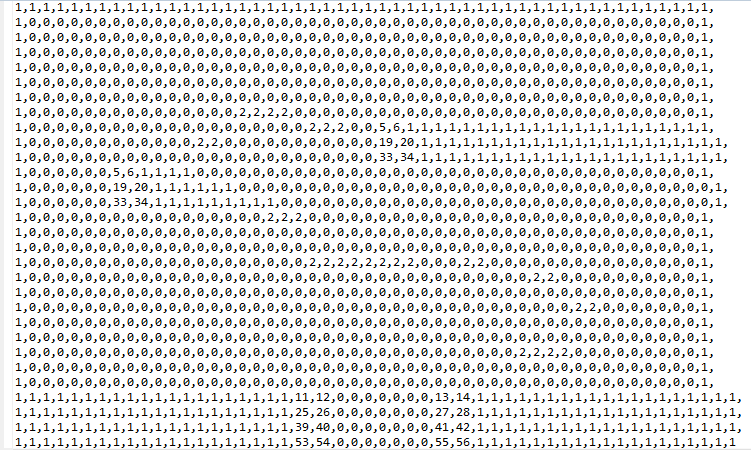
Collision is also a bit easier in this system. Rather than checking pixels, I can look up what tile the player is entering and decide if it is a collision tile or not. To determine what tile number each type of tile is, I open up the .tmx file in a text editor and I am greeted by something like this.
Slightly eye-melting, I admit. However, squint your eyes and you should see a level amidst these numbers! 0 is a transparent tile (or lack of tile), 1 is a solid block, 2 is a platform, and all of the other numbers are pieces of the curved cliff edges. With this, I can decide what tiles should cause the player to react in what ways, and keep the player from randomly falling through floors! Well..sometimes.

Saturday, January 21, 2012

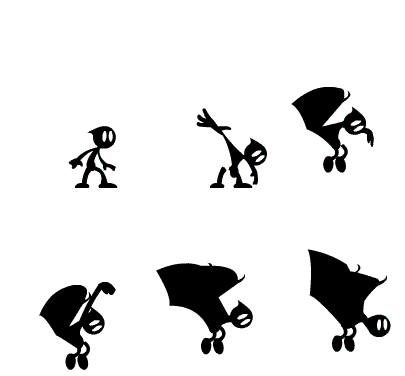
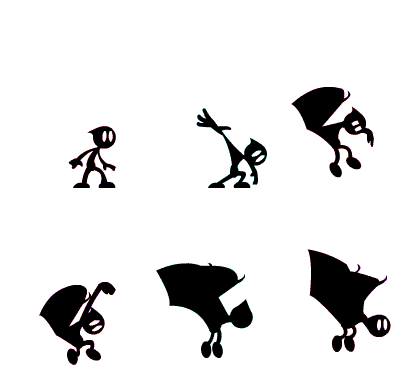
Polishing the Transform Animation

I spent a lot of today finishing up that transform animation. It gave me more trouble than a lot of the others because I had started the first pass straight ahead on 1's, 2's and 4's without much of a plan. The result I got was basically good, but needed a lot of polish

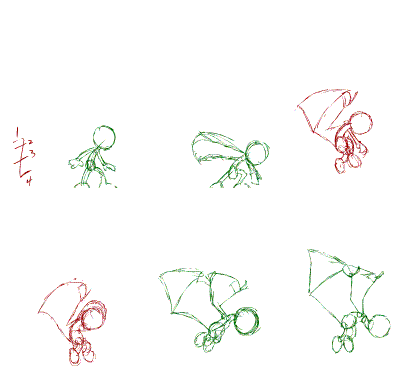
Here's what I had started with:
It's not the worst thing in the world, but there are parts that could be clarified. The idea of the transform was that his arms would pop into wings and pull him up. As a friend pointed out to me, it really isn't clear that his arms are what's changing. It almost just looks like wings are popping out of his back.

The reason is that the initial antic pose for his arm was all scrunched up like so:
Which I think could have been kind of fun....if anyone could see it...

The fact that I followed that with a vague smear didn't help much.

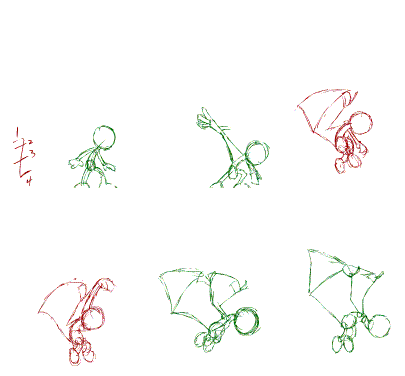
Fixing it was a simple matter of making a bigger deal out of his arm before it changed
I made the arm pose a little cleaner and had it slow in to the anticipation so that it stays around that pose for an extra frame before popping off. I also replaced the vague smear with a clearer morphing pose.

Here it is animated:
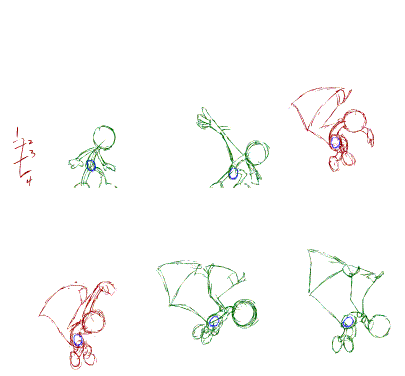
The next real issue is that the spacing's a bit of a mess. Since I did a lot of it straight ahead I hadn't planned for proper slow ins and outs, so his bounce is a little mushy. I went over the whole thing and pushed his up and down extremes a little further, while cleaning up the overall arc a bit. 
The differences are subtle, but there. From there it was mostly clean-up.
I cleaned up the body and arms first as they're the main action. The legs are all follow through, and the face is largely secondary, so I threw them inside of symbols to be dealt with later.
Then I dealt with them.

...guess that's it...

'Till next time.